Scan
Scan the attendee's QR code using your smartphone or tablet camera.

Guest Lists & Check-in
Validate tickets via camera scan, search attendees by name, and enter numerical codes manually when needed. Guest lists and ticket sales are seamlessly united in your event platform.
Request Demo ↗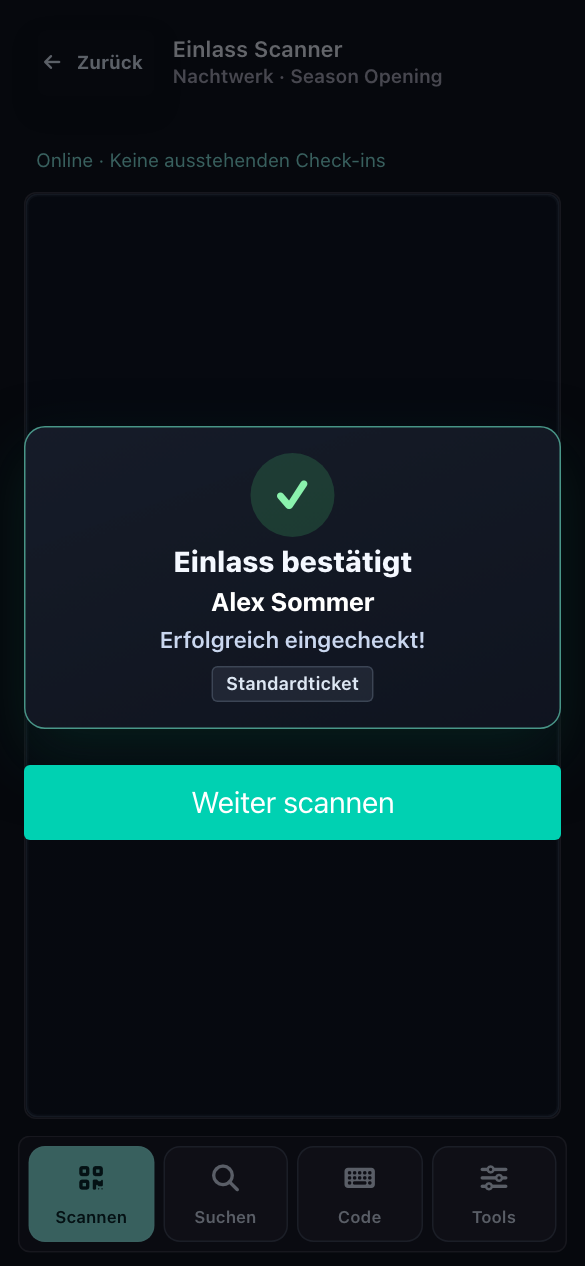
Product views displayed with sample data. Names and details are illustrative.
How Check-in Works
Scan the attendee's QR code using your smartphone or tablet camera.
Look up names quickly when an attendee cannot locate their digital ticket.
Type in the short ticket code manually whenever needed.
Clear Feedback
Successful check-ins and previously validated tickets display distinct feedback states. Warnings remain visibly pinned so your gate crew can inspect the situation immediately.


Scanner feedback screens with sample data.
Enable fast-scan mode to resume scanning automatically after valid entries. The preference is stored on each scanner device. Warnings remain on screen for manual dismissal.
Offline Resilience
Save ticket records locally on every scanner device before gates open.
Locally recorded scans synchronize automatically once internet connectivity returns.
Offline devices cannot reflect cross-gate scans in real time without connection.
Always pre-load ticket databases before the gate opens. Coordinate with your team on device assignment when operating with intermittent internet access.
Good to Know
No. Guest lists and scanner functions run in modern mobile browsers on standard smartphones and tablets. We will discuss the ideal device setup for your entrance.
Yes. In addition to camera QR scanning, instant search and manual code entry are readily accessible.
Sold tickets and attendee guest lists belong to the same centralized database. Your door staff always scans the latest ticket state.
With Eric · CEO
Tell Eric how your entrance is organized. He will show you matching features and discuss deployment and terms.
Request Demo ↗